
Pick a location. Tap Connect.
Tide VPN is a free VPN app for Android. No sign-up, no email, and you can switch between the VPN locations available to you.
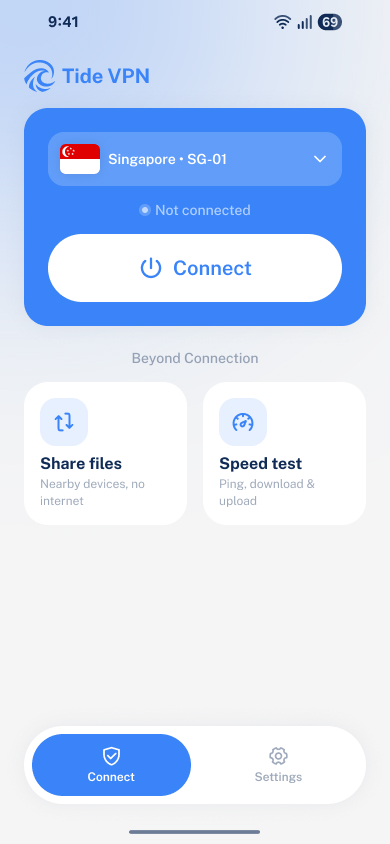
What's on the home screen
-
Choose a location
Open the list and pick from the VPN locations available right now.
-
Share files
Send files to nearby devices, no internet connection needed.
-
Connect in one tap
Tap Connect to start a VPN session. Tap again to disconnect.
-
Speed test
Check ping, download and upload speed on your current network.
Your first connection
No account to create. It takes three steps.
-
Choose a location
Open Tide VPN and pick a VPN location from the list.
-
Tap Connect
No account or email needed, so there's nothing to sign up for.
-
Approve the VPN request
Android asks you to allow the VPN connection. Tide VPN can't connect without your approval.
The app may also ask to send notifications so it can show connection status. That's optional and separate from the VPN approval; you can change it any time in your device settings.
Good to know
Short answers here. The full details are in our Privacy Policy and Terms of Service.
Is Tide VPN free?
Yes. Tide VPN is free to use.
Do I need to create an account?
No. There's no sign-up and no email address needed. Open the app, pick a location and connect.
What does the app keep on my phone?
Your selected VPN location and up to 20 recent connection-history entries. Clearing the app's storage or uninstalling the app removes them.
This information stays on your phone and isn't sent to us. Tide VPN doesn't collect personal data; the Privacy Policy explains the details.
Which locations can I connect to?
The app shows the locations available at the moment. The list can change with service capacity, maintenance and security needs.
Does Tide VPN keep logs of what I do online?
No. We don't log the websites you visit, your traffic, or your IP address. Questions? Email [email protected].